Get Updates
Get notified on the latest car launches, bike deals, and insights!


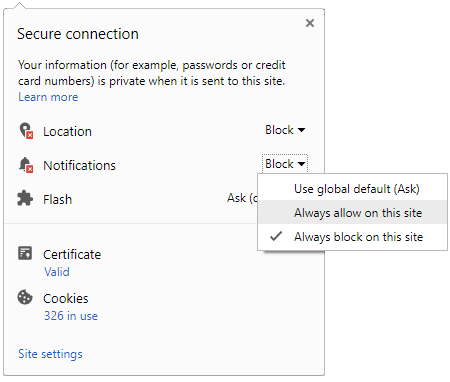
 Click it and Unblock the Notifications
Latest Auto & Bike News
-
 Auto Expo 2018: Hyundai Electric Sedan Concept To Be Revealed
-
 BMW Trolls Volvo In Its Own Hometown With Massive M5 Ad — Are The Billboard Wars Back?
-
 Mercedes CEO Roland Folger Plans To Launch BS-VI Products Before The Deadline
-
 Mahindra To Introduce Two New Electric Cars In India By 2019; Tesla Rival In The Works
-
 How Safe Is Uber India? This Driver Fraud Incident Might Give You An Insight
-
 Mahindra Plans To Enter The US Car Market With This SUV Brand
-
 Tata Dealers Stop Placing Orders For The Nano — Here's Why
-
 F1: Valtteri Bottas Wins Final Race Of The Season In Abu Dhabi
-
 Kawasaki Versys-X 300 Launched In India; Priced At Rs 4.60 Lakh
-
 Spy Pics: 2018 Ford Figo Facelift Spotted Testing In India
-
 Formula One Reveals New Logo For 2018
-
 Ranbir Kapoor Promotes The New Renault Captur SUV
-
 Why Are Cars Called ‘Cars’? — Learn Even More About Cars
-
 Jaguar F-Pace Review — Confidence Breeds Beauty
-
 Tesla Semi Violently Shows Off Brisk 0–60mph Acceleration
-
 Pirelli Reveals Expanded Tyre Range For 2018 F1 Season
-
 Jeep Scrambler Pickup To Get Optional Soft-Top Roof
-
 Ford Special Service Plug-In Hybrid Police Car Revealed


Notifications
Settings
Clear Notifications Notifications
Use the toggle to switch on notifications
- Block for 8 hours
- Block for 12 hours
- Block for 24 hours
- Don't block

Log in for Better Reading Experience!
 Continue with Google
By signing in, you agree to our Terms and Privacy Policy
Gender
Select your Gender
- Male
- Female
- Others
Age
Select your Age Range
- Under 18
- 18 to 25
- 26 to 35
- 36 to 45
- 45 to 55
- 55+