A Oneindia Venture
Get Updates
Get notified on the latest car launches, bike deals, and insights!
Manage your notification subscription by clicking on the icon.
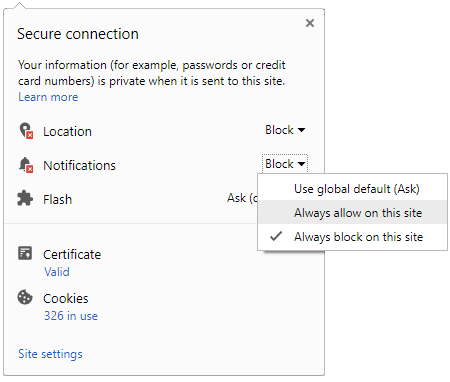
To start receiving timely alerts, as shown below click on the Green .lock. icon next to the address bar
Click it and Unblock the Notifications
Close X
Close X
To Start receiving timely alerts please follow the below steps:
Click on the Menu icon of the browser, it opens up a list of options.
Click on the .Options ., it opens up the settings page,
Here click on the .Privacy & Security. options listed on the left hand side of the page.
Scroll down the page to the .Permission. section .
Here click on the .Settings. tab of the Notification option.
A pop up will open with all listed sites, select the option .ALLOW., for the respective site under the status head to allow the notification.
Once the changes is done, click on the .Save Changes. option to save the changes.
Notifications
Clear All
No Notifications
Choose Language
English
हिंदी
ಕನ್ನಡ
മലയാളം
தமிழ்
తెలుగు
Four-Wheelers
Two-Wheelers
New Cars
Astro Services
Car Reviews
Bike Reviews
EV
Luxury Cars
Videos
Offbeat
Photos
Latest Car News
Audi R8 V10 Plus Launched; Fastest Around BIC
Volkswagen To Hire 50000 Workers From India, China
Skoda Superb Facelift Revealed In Photos
Mahindra e2o Initial Bookings Low Admits Dr Goenka
Karun Chandhok Secures His Second Le Mans Term
Toyota Corolla Altis Gets New Trims Sans Fanfare
Audi R8 V10 Plus India Launch On April 4th
Daniel Craig Drives Range Rover, Gets $1 Million
Nissan Sales Report Reveals Consistent Sales
Volvo's Car Protection April Fool's Day Joke
2013 Porsche 911 RSR GT Car Debuts
Notifications
Settings
Clear Notifications
No New Notifications
Notifications
Use the toggle to switch
on
notifications
Block for 8 hours
Block for 12 hours
Block for 24 hours
Don't block
To start receiving timely alerts, as shown below click on the Green “lock” icon next to the address bar
Click it and Unblock the Notifications
Close X
Close X
To Start receiving timely alerts please follow the below steps:
Click on the Menu icon of the browser, it opens up a list of options.
Click on the “Options ”, it opens up the settings page,
Here click on the “Privacy & Security” options listed on the left hand side of the page.
Scroll down the page to the “Permission” section .
Here click on the “Settings” tab of the Notification option.
A pop up will open with all listed sites, select the option “ALLOW“, for the respective site under the status head to allow the notification.
Once the changes is done, click on the “Save Changes” option to save the changes.
Log in for Better Reading Experience!
Continue with Google
By signing in, you agree to our
Terms
and
Privacy Policy
Gender
Select your Gender
Male
Female
Others
Age
Select your Age Range
Under 18
18 to 25
26 to 35
36 to 45
45 to 55
55+
Sign Out
✕



 Click it and Unblock the Notifications



 Continue with Google