A Oneindia Venture
Get Updates
Get notified on the latest car launches, bike deals, and insights!
Manage your notification subscription by clicking on the icon.
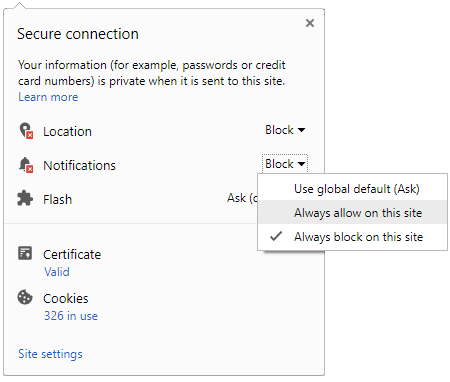
To start receiving timely alerts, as shown below click on the Green .lock. icon next to the address bar
Click it and Unblock the Notifications
Close X
Close X
To Start receiving timely alerts please follow the below steps:
Click on the Menu icon of the browser, it opens up a list of options.
Click on the .Options ., it opens up the settings page,
Here click on the .Privacy & Security. options listed on the left hand side of the page.
Scroll down the page to the .Permission. section .
Here click on the .Settings. tab of the Notification option.
A pop up will open with all listed sites, select the option .ALLOW., for the respective site under the status head to allow the notification.
Once the changes is done, click on the .Save Changes. option to save the changes.
Notifications
Clear All
No Notifications
Choose Language
English
हिंदी
ಕನ್ನಡ
മലയാളം
தமிழ்
తెలుగు
Four-Wheelers
Two-Wheelers
New Cars
Astro Services
Car Reviews
Bike Reviews
EV
Luxury Cars
Videos
Offbeat
Photos
Latest Car News
Hyundai To Bring 6 SUVs To India In The Next 24 Months
Mercedes GLB SUV Teased — Will Come To India
New Ford Bronco Will Sport Removable Doors & Roof — Here's Hpow They'll Work
Bentley Bentayga V8 Design Series Revealed — Brit Luxury SUV Gets Cooler
Tata Motors Sells Over 2 lakh Cars During FY18-19; Posts 12.18 Percent Growth
Jeep Teases Two Gladiator-Based Concepts For Moab
Spied: Maruti Baleno Hybrid Spotted Testing - Video
Mahindra To Invest Up To $400 Million In Zoomcar — Report
EV Range Anxiety May Soon Be A Thing Of The Past With New 1000km Range EV Battery
McLaren Senna Gets Added To Forza Motorsport 7 In Latest Update
Anand Mahindra Is Impressed By 11-Year-Old Girl’s Solution To The Honking Menace In India
Notifications
Settings
Clear Notifications
No New Notifications
Notifications
Use the toggle to switch
on
notifications
Block for 8 hours
Block for 12 hours
Block for 24 hours
Don't block
To start receiving timely alerts, as shown below click on the Green “lock” icon next to the address bar
Click it and Unblock the Notifications
Close X
Close X
To Start receiving timely alerts please follow the below steps:
Click on the Menu icon of the browser, it opens up a list of options.
Click on the “Options ”, it opens up the settings page,
Here click on the “Privacy & Security” options listed on the left hand side of the page.
Scroll down the page to the “Permission” section .
Here click on the “Settings” tab of the Notification option.
A pop up will open with all listed sites, select the option “ALLOW“, for the respective site under the status head to allow the notification.
Once the changes is done, click on the “Save Changes” option to save the changes.
Log in for Better Reading Experience!
Continue with Google
By signing in, you agree to our
Terms
and
Privacy Policy
Gender
Select your Gender
Male
Female
Others
Age
Select your Age Range
Under 18
18 to 25
26 to 35
36 to 45
45 to 55
55+
Sign Out
✕



 Click it and Unblock the Notifications



 Continue with Google