Get Updates
Get notified on the latest car launches, bike deals, and insights!


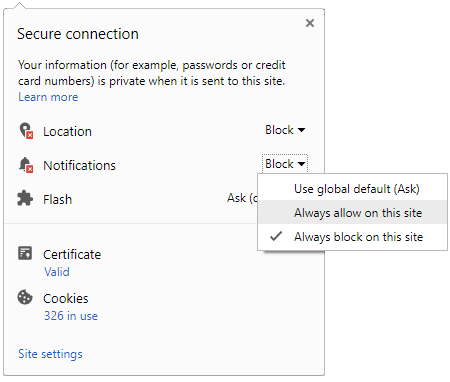
 Click it and Unblock the Notifications
Latest Auto & Bike News
-
 Jaguar F-Pace Becomes More Affordable In India — Cheaper By Nearly Rs 16 Lakh
-
 2017 Mahindra Scorpio Facelift Launched In India; Prices Start At Rs 9.97 Lakh
-
 Honda Cliq — What Makes It Click In The Indian Market
-
 Newly Launched Maruti S-Cross Facelift Makes A Significant Impact In October Sales
-
 BMW Catches Fire In Mumbai; Owner Alleges Denying Of Services By Roadside Assistance
-
 KTM Reveals Launch Details Of Husqvarna Bikes In India
-
 Lamborghini Urus SUV Teased Ahead Of Reveal
-
 2019 Chevrolet Corvette ZR1 Revealed — Fastest & Most Powerful Production Corvette Ever
-
 Tata Nexon AMT: More Details Revealed Ahead of Launch
-
 Mahindra Set To Launch The Scorpio Facelift — Here Are The Changes You Should Know
-
 Spy Pics: Mahindra XUV500 Facelift Spotted Testing In India
-
 India-Bound Skoda Karoq Impresses In Euro NCAP Crash Tests
-
 Volkswagen Beetle Electric In The Works
-
 Valencia MotoGP: Marc Marquez Wins Fourth Title In Dramatic Season Finale
-
 Tata Nexon Waiting Period To Decrease — Here's How
-
 Kawasaki Ninja 650 KRT Edition Launched In India; Priced At Rs 5.69 Lakh
-
 Ford EcoSport Facelift Vs Maruti Brezza Vs Tata Nexon Mileage Comparison
-
 Iconic Scooter Brand Lambretta Is Back; India Entry In 2019


Notifications
Settings
Clear Notifications Notifications
Use the toggle to switch on notifications
- Block for 8 hours
- Block for 12 hours
- Block for 24 hours
- Don't block

Log in for Better Reading Experience!
 Continue with Google
By signing in, you agree to our Terms and Privacy Policy
Gender
Select your Gender
- Male
- Female
- Others
Age
Select your Age Range
- Under 18
- 18 to 25
- 26 to 35
- 36 to 45
- 45 to 55
- 55+