A Oneindia Venture
Get Updates
Get notified on the latest car launches, bike deals, and insights!
Manage your notification subscription by clicking on the icon.
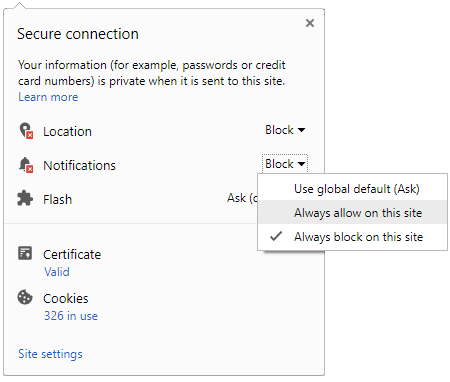
To start receiving timely alerts, as shown below click on the Green .lock. icon next to the address bar
Click it and Unblock the Notifications
Close X
Close X
To Start receiving timely alerts please follow the below steps:
Click on the Menu icon of the browser, it opens up a list of options.
Click on the .Options ., it opens up the settings page,
Here click on the .Privacy & Security. options listed on the left hand side of the page.
Scroll down the page to the .Permission. section .
Here click on the .Settings. tab of the Notification option.
A pop up will open with all listed sites, select the option .ALLOW., for the respective site under the status head to allow the notification.
Once the changes is done, click on the .Save Changes. option to save the changes.
Notifications
Clear All
No Notifications
Choose Language
English
हिंदी
ಕನ್ನಡ
മലയാളം
தமிழ்
తెలుగు
Four-Wheelers
Two-Wheelers
New Cars
Astro Services
Car Reviews
Bike Reviews
EV
Luxury Cars
Videos
Offbeat
Photos
Latest Auto & Bike News
Nissan CARnival 2015 Held At Buddh International Circuit
E-Cart From Small-Time Madurai Firm Favoured Over Chinese Competition
Volvo Opens New Dealership In Mumbai
Isuzu Bags Order For 25 MU-7 SUVs From Bangalore Travel Operator
Beginner's Guide To Car Insurance
China Completes Successful Waste Cooking Oil-Fuelled Passenger Flight
Volvo Planning Increased Sales of 2,000 Cars In India For 2015
Chevrolet’s “Teen Driver” Tech To Safeguard Against Teen Immaturity
A Starters Guide To Car Insurance
KTM Duke 390 Vs Benelli TNT 300: Battle Of the 300s
Should You Or Should You Not Turn On A Crashed Vehicle
Ducati India Pvt. Ltd. Re-Enters With Three New Dealerships
Nissan To Introduce Cheaper Model Of Datsun By 2016 In India
Motorcyclist Goes Shopping On His Dirt Bike
Honda Bulldog Concept Unveiled At Osaka Motorcycle Show
Tata Motors To Launch Six New SUVs To Overcome Competitors
Pioneer Launches Android Auto-Compatible Receivers
Volvo XC90 India Launch Expected By September This Year
Previous
Next
Notifications
Settings
Clear Notifications
No New Notifications
Notifications
Use the toggle to switch
on
notifications
Block for 8 hours
Block for 12 hours
Block for 24 hours
Don't block
To start receiving timely alerts, as shown below click on the Green “lock” icon next to the address bar
Click it and Unblock the Notifications
Close X
Close X
To Start receiving timely alerts please follow the below steps:
Click on the Menu icon of the browser, it opens up a list of options.
Click on the “Options ”, it opens up the settings page,
Here click on the “Privacy & Security” options listed on the left hand side of the page.
Scroll down the page to the “Permission” section .
Here click on the “Settings” tab of the Notification option.
A pop up will open with all listed sites, select the option “ALLOW“, for the respective site under the status head to allow the notification.
Once the changes is done, click on the “Save Changes” option to save the changes.
Log in for Better Reading Experience!
Continue with Google
By signing in, you agree to our
Terms
and
Privacy Policy
Gender
Select your Gender
Male
Female
Others
Age
Select your Age Range
Under 18
18 to 25
26 to 35
36 to 45
45 to 55
55+
Sign Out
✕