Get Updates
Get notified on the latest car launches, bike deals, and insights!


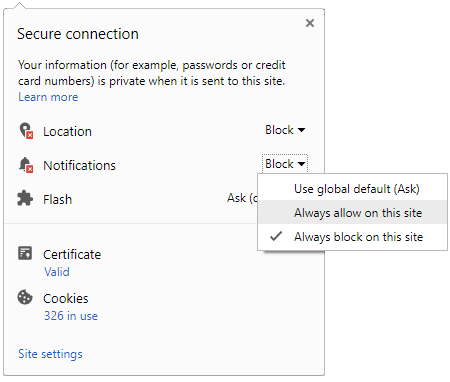
 Click it and Unblock the Notifications
Latest Auto & Bike News
-
 Tesla Model 3 Body-In-White Revealed In Leaked Brochure
-
 Speed Governers For Imported Vehicles In India — Is This Really The Solution?
-
 This Bus Stand Gets AC To Escape The Scorching Heat
-
 Skoda Karoq Teased Ahead Of Global Debut
-
 Volvo To Assemble Cars In India — Made In India Car To Roll Out This Year
-
 Spy Pics: Lamborghini Urus Spotted Testing Its Limits In The Green Hell
-
 McLaren Design Director Might Head Back To MINI
-
 BMW Reveals Limited Run M240i M Performance Edition
-
 Nicky Hayden In Critical Condition After Cycling Accident
-
 2017 Fiat Punto (Argo) Revealed In New Images
-
 Ford Announce Plans For Massive Job Cuts — Will Trump Intervene?
-
 Watch Alonso Perform An Awesome Double Overtake During Indy 500 Practice
-
 Remember The Koenigsegg Agera RS That Crashed? Here’s What The Carmaker Intends To Do
-
 Royal Enfield Continental GT Modified Into A Mean Looking Machine
-
 Maruti Dzire Waiting Period Is Already At Crazy Levels — Reason Revealed
-
 Horrific Crash Splits Car In Half — Driver Survives
-
 Nurburgring King Honda Civic Type R's New Ad Looks Towards Its Racing Heritage
-
 Maruti S-Cross Facelift Set To Launch Around Diwali


Notifications
Settings
Clear Notifications Notifications
Use the toggle to switch on notifications
- Block for 8 hours
- Block for 12 hours
- Block for 24 hours
- Don't block

Log in for Better Reading Experience!
 Continue with Google
By signing in, you agree to our Terms and Privacy Policy
Gender
Select your Gender
- Male
- Female
- Others
Age
Select your Age Range
- Under 18
- 18 to 25
- 26 to 35
- 36 to 45
- 45 to 55
- 55+