A Oneindia Venture
Get Updates
Get notified on the latest car launches, bike deals, and insights!
Manage your notification subscription by clicking on the icon.
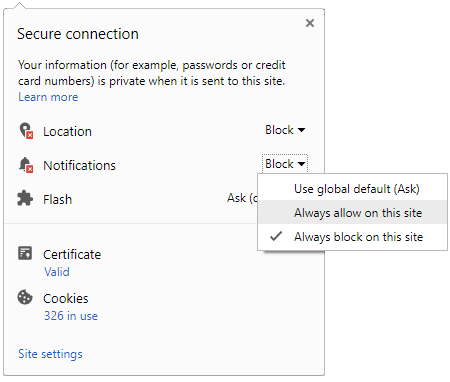
To start receiving timely alerts, as shown below click on the Green .lock. icon next to the address bar
Click it and Unblock the Notifications
Close X
Close X
To Start receiving timely alerts please follow the below steps:
Click on the Menu icon of the browser, it opens up a list of options.
Click on the .Options ., it opens up the settings page,
Here click on the .Privacy & Security. options listed on the left hand side of the page.
Scroll down the page to the .Permission. section .
Here click on the .Settings. tab of the Notification option.
A pop up will open with all listed sites, select the option .ALLOW., for the respective site under the status head to allow the notification.
Once the changes is done, click on the .Save Changes. option to save the changes.
Notifications
Clear All
No Notifications
Choose Language
English
हिंदी
ಕನ್ನಡ
മലയാളം
தமிழ்
తెలుగు
Four-Wheelers
Two-Wheelers
New Cars
Astro Services
Car Reviews
Bike Reviews
EV
Luxury Cars
Videos
Offbeat
Photos
Latest Auto & Bike News
Nissan Kicks To Be Launched At The 2016 Rio Olympics
Hero Unveils 'Centre of Innovation And Technology' In Jaipur
Snowmobile Rider Rips Through Snowed Out City - Video
Fancy A Trip To Space? Here Are Some Amazing Advancements In Technology
Mitsubishi Unveils New Dealership In Tirunelveli
Fast And Raging: Turbocharged Petrol Cars In India
Karnataka High Court Repeals Discriminatory Road Tax Law
Suzuki To Launch New Access 125 On March 15
Top 5 Best Safest Cars In India In 2016
World's Longest Motorcycle Burnout - Video
Honda Rolls Out Its Five-Seater Fuel Cell Vehicle, Clarity
Maruti Suzuki Vitara Brezza Bookings Cross 2600 in 24 Hours
Hyundai Signs Sponsorship Deal With BCCI
Top 10 Tattoo Fails: This Is What You Should Not To Do!
Maruti Suzuki Exports Made In India Baleno To Parent Market
Tata Tiago Bookings Start On March 10 For Rs. 10,000
INSV Mhadei Is Crewed By Women Only; But Did You Know These Facts?
Fernando Alonso Still Not Happy With McLaren Honda
Previous
Next
Notifications
Settings
Clear Notifications
No New Notifications
Notifications
Use the toggle to switch
on
notifications
Block for 8 hours
Block for 12 hours
Block for 24 hours
Don't block
To start receiving timely alerts, as shown below click on the Green “lock” icon next to the address bar
Click it and Unblock the Notifications
Close X
Close X
To Start receiving timely alerts please follow the below steps:
Click on the Menu icon of the browser, it opens up a list of options.
Click on the “Options ”, it opens up the settings page,
Here click on the “Privacy & Security” options listed on the left hand side of the page.
Scroll down the page to the “Permission” section .
Here click on the “Settings” tab of the Notification option.
A pop up will open with all listed sites, select the option “ALLOW“, for the respective site under the status head to allow the notification.
Once the changes is done, click on the “Save Changes” option to save the changes.
Log in for Better Reading Experience!
Continue with Google
By signing in, you agree to our
Terms
and
Privacy Policy
Gender
Select your Gender
Male
Female
Others
Age
Select your Age Range
Under 18
18 to 25
26 to 35
36 to 45
45 to 55
55+
Sign Out
✕