A Oneindia Venture
Get Updates
Get notified on the latest car launches, bike deals, and insights!
Manage your notification subscription by clicking on the icon.
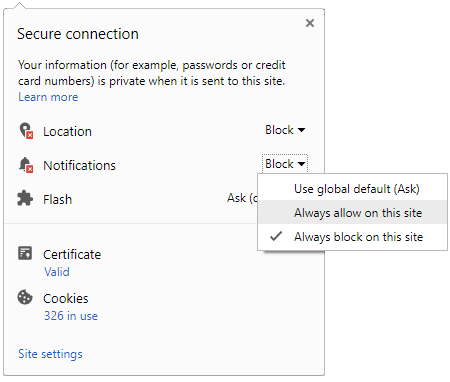
To start receiving timely alerts, as shown below click on the Green .lock. icon next to the address bar
Click it and Unblock the Notifications
Close X
Close X
To Start receiving timely alerts please follow the below steps:
Click on the Menu icon of the browser, it opens up a list of options.
Click on the .Options ., it opens up the settings page,
Here click on the .Privacy & Security. options listed on the left hand side of the page.
Scroll down the page to the .Permission. section .
Here click on the .Settings. tab of the Notification option.
A pop up will open with all listed sites, select the option .ALLOW., for the respective site under the status head to allow the notification.
Once the changes is done, click on the .Save Changes. option to save the changes.
Notifications
Clear All
No Notifications
Choose Language
English
हिंदी
ಕನ್ನಡ
മലയാളം
தமிழ்
తెలుగు
Four-Wheelers
Two-Wheelers
New Cars
Astro Services
Car Reviews
Bike Reviews
EV
Luxury Cars
Videos
Offbeat
Photos
Offbeat Stories
Night Driving Tips During Monsoons in India
'Gasoline' Meets Electricity: The Stunning Neo-Retro Bobber By Bulleteer Customs
Baba Ramdev's Garage Welcomes The Land Rover Defender 130, Worth Rs 1.41 Crore - Viral Video
'Rain, Rain, Go Away' - Dehumidifying Your Car During Monsoons Made Easy!
Hero Electric, Okinawa, And Five More EV Makers Told To Refund FAME II Incentives - Central Govt
Protect Your Car From Rain Damage: Essential Tips For Car Owners In The Monsoon
ISRO's PSLV-C56 Set To Launch With Six Co-Passenger Satellites On July 30 - All You Need To Know
NHAI Bans Slow-Moving Vehicles on Bengaluru-Mysuru Expressway - Prioritising Safety
How to Maintain Your Brakes in Wet Conditions: Keep Your Car Running Well
NEXA Celebrates 8 Year Anniversary: A Brand For Global Automotive Experiences
Hydroplaning: What Is It And How Can We Prevent It?
Notifications
Settings
Clear Notifications
No New Notifications
Notifications
Use the toggle to switch
on
notifications
Block for 8 hours
Block for 12 hours
Block for 24 hours
Don't block
To start receiving timely alerts, as shown below click on the Green “lock” icon next to the address bar
Click it and Unblock the Notifications
Close X
Close X
To Start receiving timely alerts please follow the below steps:
Click on the Menu icon of the browser, it opens up a list of options.
Click on the “Options ”, it opens up the settings page,
Here click on the “Privacy & Security” options listed on the left hand side of the page.
Scroll down the page to the “Permission” section .
Here click on the “Settings” tab of the Notification option.
A pop up will open with all listed sites, select the option “ALLOW“, for the respective site under the status head to allow the notification.
Once the changes is done, click on the “Save Changes” option to save the changes.
Log in for Better Reading Experience!
Continue with Google
By signing in, you agree to our
Terms
and
Privacy Policy
Gender
Select your Gender
Male
Female
Others
Age
Select your Age Range
Under 18
18 to 25
26 to 35
36 to 45
45 to 55
55+
Sign Out
✕



 Click it and Unblock the Notifications



 Continue with Google